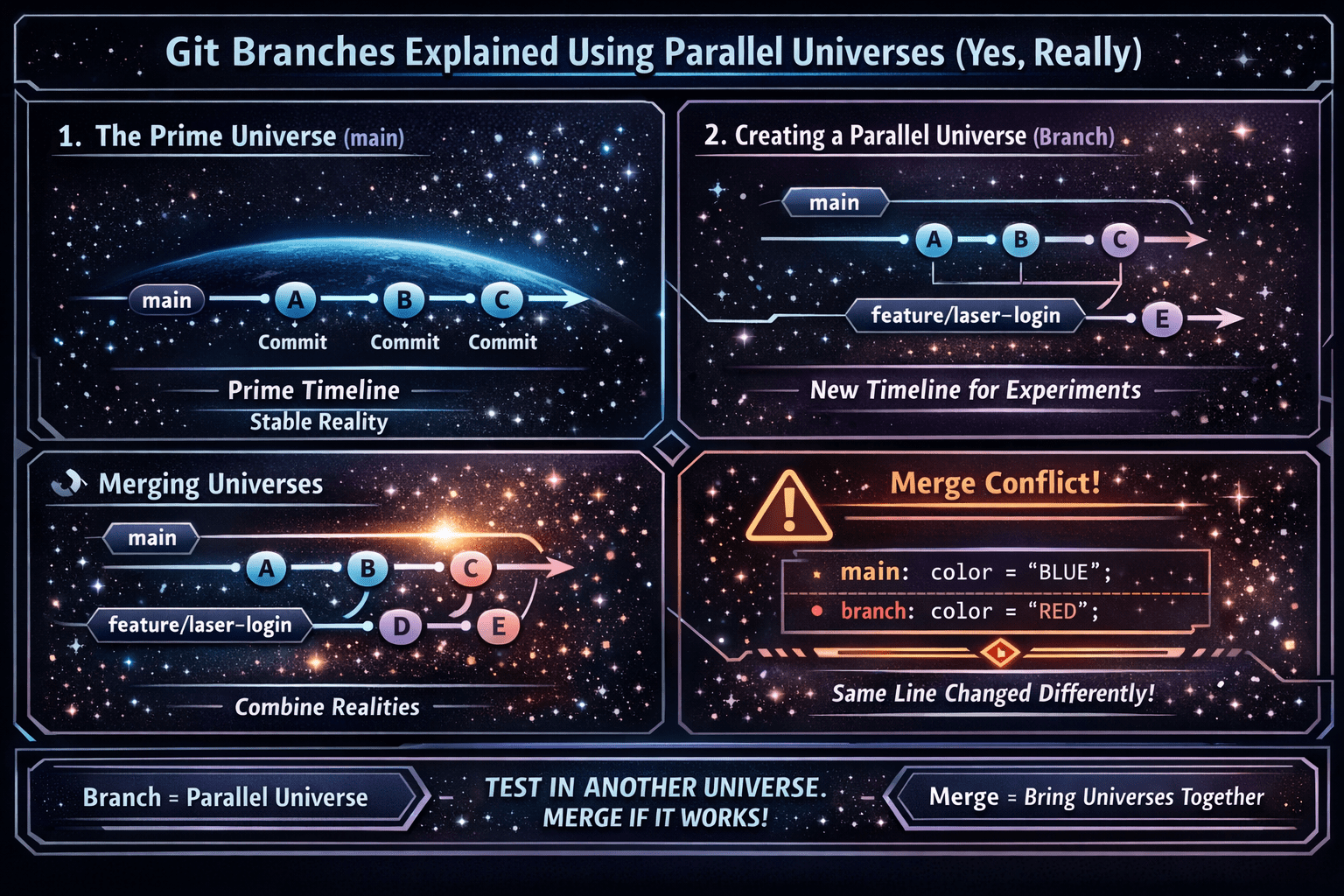
Imagine your project is the “Prime Universe”
Your codebase lives in one official timeline your team trusts. In Git, that timeline is usually:
main(or sometimesmaster)
That’s your Prime Universe: the reality you ship.
A Git branch is a parallel universe
When you create a branch, you’re not doing a messy “duplicate folder” thing. You’re creating a new timeline that starts at the same moment as Prime—then you can make changes there without breaking Prime.
Illustrated guide: timelines, not folders
1) The Prime Universe (main)
(main)  A --- B --- C
        ^     ^     ^
      commit commit commit
Each letter is a commit: a snapshot of your project at a point in time.
2) You open a new universe: a branch
You want to add a feature called laser-login. You create a branch:
(main)         A --- B --- C
                         \
(feature/laser-login)     D --- E
What happened?
feature/laser-loginstarts at commitC- You keep working in that universe (
D,E) mainstays safe and unchanged
This is why branches make version control simple: you experiment elsewhere, without risking production reality.
Why branches are useful (simple human reasons)
Branches let you:
- Build features without breaking the live app
- Fix bugs fast without mixing them with new work
- Test risky ideas safely
- Collaborate without overwriting each other’s code
Think of it like this: “Try stuff in another universe, then merge it if it works.”
The branch pointer: the “you are here” sign
A branch name is basically a label pointing to the latest commit in that timeline.
Example concept:
feature/laser-loginpoints toEmainpoints toC
When you commit again on the branch, that label moves forward. That’s why branches are lightweight.
Switching universes: checkout / switch
When you switch branches, you’re telling Git:
“Show me the files from that universe.”
- Switch to
main→ you seeA-B-C - Switch to
feature/laser-login→ you seeA-B-C-D-E
Merging: when two universes collide (in a good way)
When your feature is ready, you merge it back into Prime (main).
Before merge:
(main)                   A --- B --- C
                                   \
(feature/laser-login)               D --- E
After merge:
(main)  A --- B --- C --------- F
                         \     /
(feature/laser-login)     D --- E
F is often a merge commit. It’s Git saying:
“Prime Universe now includes everything that happened in the feature universe.”
Merge conflicts: when reality disagrees
Sometimes both universes changed the same line in different ways.
mainchanged a line to “blue”- your branch changed that same line to “red”
Git can’t guess which is correct. That’s a merge conflict.
A conflict is not Git failing—Git is being honest:
“Two realities don’t match. You decide the final canon.”
Common branch types (good names)
Use names that read like mission logs:
feature/user-profilesfix/login-redirecthotfix/payment-crashchore/update-deps
Clear names make history easier to understand.
Simple workflow: branch → commit → merge
- Start in Prime (
main) - Create a branch (parallel universe)
- Commit changes as you build
- Merge back into Prime
- Delete the branch (optional, but common)
Mini story (so it sticks)
You’re on main. Everything is stable.
You need a new feature: Teleport Search.
You create feature/teleport-search and build it there.
Prime stays stable. Users stay happy.
When it works, you merge it into Prime.
That’s the whole idea of branches.
Checklist: keep “version control simple”
- ✅ main = Prime Universe
- ✅ branch = parallel universe
- ✅ commit = checkpoint in time
- ✅ merge = combine universes
- ✅ conflict = same thing changed differently