Me: Mom, you know how restaurants work, right?
Mom: I’ve eaten at enough of them. Yes.
Me: Perfect. Then you already understand APIs.
Mom: I highly doubt that.
Me: Okay—imagine you’re at a restaurant. You sit at a table, you look at a menu, you tell the waiter what you want, and then food arrives.
Mom: That’s the dream.
Me: In tech terms:
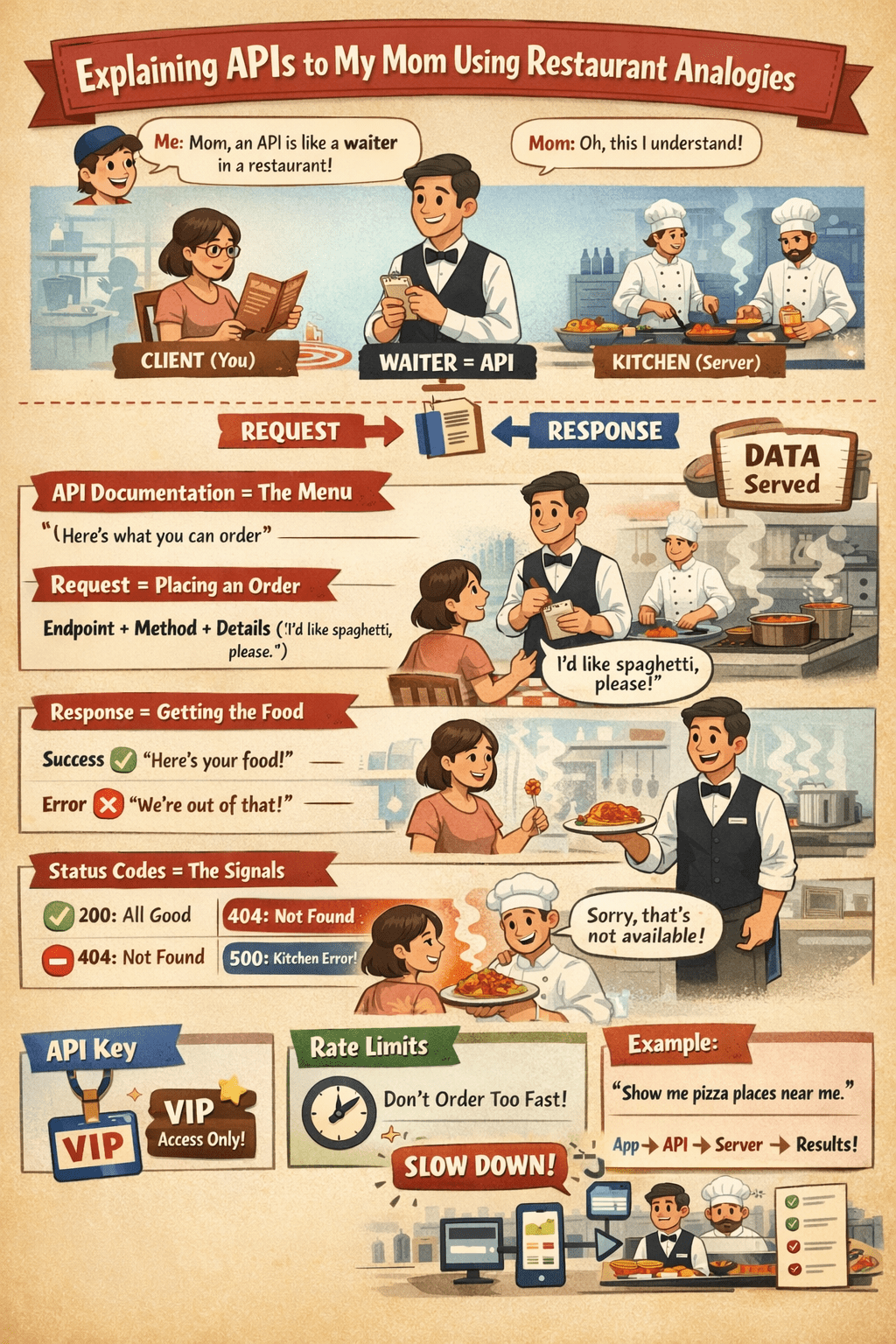
- You = the client (like an app or a website)
- The kitchen = the server (where the work happens)
- The waiter = the API (the messenger that takes requests and brings back results)
Mom: So the waiter is… the API?
Me: Exactly. An API (Application Programming Interface) is like a waiter that lets one system ask another system for something—without going into the kitchen.
1) What an API really does
Mom: Why can’t I just go into the kitchen?
Me: Because that would be chaos. The kitchen needs rules. The waiter enforces rules.
APIs do the same thing:
- They define what you can ask for
- They define how you must ask
- They define what you’ll get back
Mom: So an API is basically rules + communication?
Me: Yes. It’s a controlled way for software to talk to other software.
2) The menu = API documentation
Mom: Okay, so where do I see what I’m allowed to order?
Me: The menu.
In API world, the “menu” is the API documentation.
Mom: Like “We have pizza, pasta, salad”?
Me: Yes—except it’s more like:
- “You can request a list of products.”
- “You can request a user profile.”
- “You can submit a payment.”
Mom: And if I ask for something not on the menu?
Me: The waiter says: “Sorry, we don’t serve that.”
In API terms, you get an error.
3) Ordering food = making a request
Mom: So when I say “I want spaghetti,” that’s the request?
Me: Exactly. In APIs, a request usually has:
- An endpoint (what you’re asking for)
- A method (what action you want)
- Parameters (extra details)
Mom: Slow down. Endpoint?
Me: Endpoint is like the menu item section.
- “Desserts”
- “Drinks”
- “Main dishes”
In an API, an endpoint might be like:
/users/products/orders
Mom: And “method”?
Me: Method is like what you’re doing with the order:
- GET = “Let me see what you have.” (read)
- POST = “Place a new order.” (create)
- PUT/PATCH = “Change my order.” (update)
- DELETE = “Cancel my order.” (remove)
Mom: So GET is browsing the menu, POST is ordering, DELETE is canceling. Easy.
4) The kitchen’s response = API response
Mom: And then the kitchen sends food.
Me: Yes. That’s the response.
And responses can be:
- ✅ Success: Here’s your food (data)
- ❌ Error: We’re out of that item / you ordered wrong
Mom: How does the “food” look in tech?
Me: Usually like a structured receipt—most commonly JSON.
Mom: JSON sounds like a guy who delivers pizzas.
Me: Close enough. JSON is just a neat way to package information.
5) Status codes = the restaurant’s “what happened” signals
Mom: How do I know if my order worked?
Me: Restaurants have signals:
- Food arrives (good)
- Waiter says “we’re out” (bad)
- Manager says “you can’t order that” (also bad)
APIs use status codes, like a quick number summary:
- 200 = “All good, here’s what you asked for.”
- 201 = “Created! Your order is placed.”
- 400 = “Your order doesn’t make sense.” (bad request)
- 401 = “You’re not allowed until you show ID.” (not logged in)
- 403 = “Even with ID, you can’t order that.” (forbidden)
- 404 = “That menu item/endpoint doesn’t exist.”
- 500 = “Kitchen problem.” (server error)
Mom: So 500 is “the chef is panicking.”
Me: Exactly.
6) API keys = your reservation / VIP bracelet
Mom: Why would I not be allowed to order?
Me: Some restaurants require:
- A reservation
- A membership
- A wristband
- Or payment first
APIs often require an API key (a secret code) to prove you’re allowed to use it.
Mom: Like a VIP card?
Me: Yes—except you must not share it, because it can be used on your behalf.
7) Rate limits = “Stop ordering so fast”
Mom: What if I keep ordering over and over?
Me: The restaurant will say:
“Ma’am… please. The kitchen can’t handle 300 orders in one minute.”
APIs do this too. It’s called a rate limit:
- “You can only make X requests per minute.”
Mom: So it’s like a traffic control for hungry customers.
Me: Perfect.
8) Real example in restaurant talk
Mom: Give me a full example.
Me: Okay.
Scenario: You open a food delivery app and search “pizza near me.”
Mom: I do that.
Me: Behind the scenes:
- The app (client) asks the API (waiter):
“Show me pizza places near this location.” - The API takes that request to the server (kitchen).
- The server replies with a list (food/receipt):
Names, ratings, delivery time, price. - The API returns it to the app.
Mom: So the app isn’t magically finding restaurants—it’s asking another system through an API.
Me: Exactly. APIs are the reason your apps can:
- show maps,
- log you in with Google,
- process payments,
- load product lists,
- send notifications.
Quick recap (Mom-proof)
Mom: Summarize it without the nerd words.
Me:
An API is like a waiter between you and a kitchen:
- You can only order what’s on the menu (documentation)
- You place an order (request)
- You get food or an apology (response)
- The number on the receipt tells you what happened (status code)
- Sometimes you need a VIP card (API key)
- And you can’t spam orders (rate limit)
Mom: I hate that I understand this now.
Me: That’s how you know it worked.